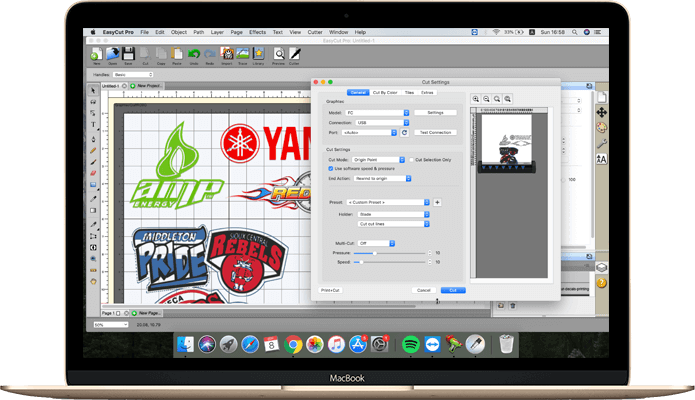
The best choice in vinyl cutting software solution packaged with everything you need to get started. The Pro version is more meant for businesses that use the larger vinyl cutter and cutting plotter.



Draw your own shapes directly on the mat, Create original designs very easily using various shapes and drawing tools. you'll find that the design solutions are endless.

WYSIWYG text layout and design with all your fonts on your computer, 4 different types of type tools and add a variety of effects to text objects.

Powerful tools designed to edit nodes that can enhance vector objects. Supports many different types of transforming and editing nodes, curves, and etc.

Import a wide range of vector based file formats, such as DXF, PLT, PDF, AI, SVG, EPS, WPC, GSD, PNG, SCUT, FCM and so on.

Unmatched image vectorization - Quickly convert any raster images (JPG, PNG, GIF, BMP, TIFF) into cuttable vector path designs in just a few clicks.

A variety of effects can be applied to your designs, such as 3D Rotate, Bulge, Lattice, Wrapper, Title Crawl, Canned, Shadow, Knockout, 3D Extrude, Wave, and etc.

Easily create custom rhinestone designs that can be output with a vinyl cutter, You can specify stone size and spacing to make your own rhinestone template.

Powerful nesting with advanced optimisation techniques give unparalleled material savings. Start optimizing and minimise material waste!

Welding will take two or more selected overlapping images and join them together into one single shape. There are two ways to weld overlapping shapes.

If your design is wider than the maximum cutting width of your cutting machine, you can use this to fast and accurate split up the design into smaller tiles.

Remove the excess vinyl from in between shapes and around their respective edges. This feature will add a weeding border around the selected shapes.

Gives you instant, easy access to over 350 pre-made shapes in the built in shapes library for Free. Shape cutting has never been easier!

Use layers to easily organize objects that help you to more control over how you organize, edit and cut objects with EasyCut Pro.

The easy way to separate the different colors in your artwork to separate cut jobs. Cut and manage even complex designs with ease.

Full control your cutter with a variety of settings: origin point, WYSIWYG, cut selection only, duplicate cut, print and cut, cut by color, and many other options.

Manually control cutting order and optimize your cutting operations. Starting the cutting simulator that shows the cutting order in the animation.

EasyCut Pro has options to rewinds back to the origin, do nothing or advance a specified amount.

Specifying the number of copies of the job. Easily create multiple copies of the same object.

Supports a large number of cutter manufacturers and models, including popular one such as Graphtec, Roland, Mimaki, GCC, Vevor, USCutter and so on.

Easily create an outline around objects, shapes and text etc. Creating your print and cut files for contour cutting of stickers and decals has never been easier.

Making signs, decals, logos and stickers fast has never been easier. This cutting software features such a user-friendly design that it's usable by anyone.

I regularly recommend EasyCut Pro to my friends, largely thanks to its straightforward and user-friendly design. These days, it’s my go-to software for every step of the process -- from creating designs to the final cut. Thank you for developing such an excellent cutting plotter program.

This is an excellent vinyl plotter software! I replaced the original software that came with my husband’s vinyl plotter with it, and it has been a fantastic upgrade. It’s simple to learn and handles all my cutting tasks perfectly. Truly a top-notch sticker cutting program.

I absolutely love this vinyl cutting software. It’s far more intuitive, professional and user-friendly compared to the original program that came with my vinyl cutter, and it works flawlessly with my Graphtec CE-6000 cutter and macOS. I couldn’t be happier with my purchase.
So what are you waiting for? Just download and you're ready to cut! Trusted by more than 40K happy customers worldwide.